Computer Network Course Design: Routed Lab Network and Java Chat System
A two-week course design in two parts: a two-router lab network with static routes, RIP, an access list and a DNS server, and a multi-user chat program in Java with its own framing protocol over TCP and SQLite storage.
- Period
- July 2026
- Context
- Comprehensive Course Design of Computer Network
- Team
- Individual project
- My role
- Router configuration and DNS set-up; author of the chat program and the report
- Status
- Completed; course grade 90/100
Demo & artifacts
- Open demoSimulated data
The walkthrough models the lab network with the addresses, routes and access list from my report: send pings, traceroutes and DNS queries, switch between static routes and RIP, and move the access list. A second part runs the chat program's framing code, rewritten in TypeScript, on a byte stream that TCP splits at random.
My contribution
- Cabled and configured two DCR-2626 routers through their console ports: Ethernet and PPP serial interfaces at 64 kbit/s, static routes, then RIP after removing the static routes, which would otherwise win on administrative distance.
- Set up DNS on Windows Server: a forward zone test.com with www → 192.168.108.2, the matching reverse zone and PTR record. PC0 then resolved the name and reached the host across both routers.
- Configured a named standard access list on Router0 and tested it with tracert.
- Wrote a client/server chat program in Java with a Swing client and TCP sockets: online list, private, room and group chat, friends with requests and remarks, profiles and avatars, images and chunked file transfer, recall within two minutes (checked by the server), offline messages, history and search in SQLite, a typing indicator, unread badges and a Chinese/English switch. The report lists 21 features.
- Designed the wire format: fields separated by the control character SOH, UTF-8 text, and each frame ended with the byte 0xFF, which never occurs in UTF-8. Images and files are Base64-encoded so they travel in the same frames. Each client receives on one thread and sends from a thread-safe queue on another.
The routing experiment was carried out at a shared lab bench (group 8). The report and the chat program were submitted under my name.
The lab network
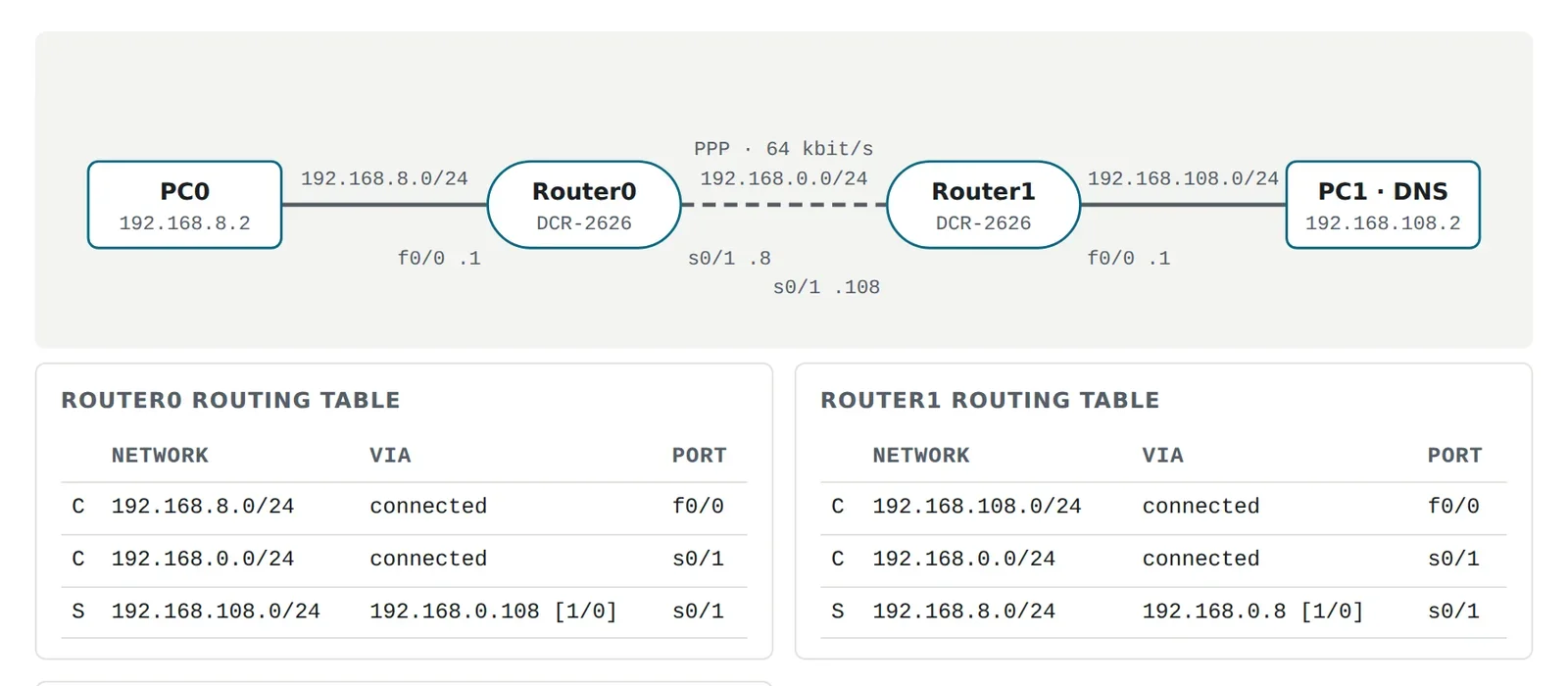
Two routers, each with a PC on its Ethernet port, joined by a V.35 serial cable running PPP at 64 kbit/s. Every device needed an address and a route to the other side: first static routes, then RIP. Static routes have administrative distance 1 and RIP 120, so the static routes had to be removed before RIP’s routes could take over.
- PC0: 192.168.8.2/24, default gateway 192.168.8.1
- Router0: f0/0 192.168.8.1, s0/1 192.168.0.8
- Router1: s0/1 192.168.0.108, f0/0 192.168.108.1
- PC1 (DNS server): 192.168.108.2/24, default gateway 192.168.108.1
On top of that came a DNS server for test.com on the far network and an access list on Router0. The walkthrough lets you send packets through all of this and watch each router’s decision.
The chat program
The server accepts connections on port 3500, or the next free port, and gives each client to a ConnectionKeeper. It forwards messages, stores them in SQLite and pushes the online list whenever someone joins or leaves. The client keeps reading and sending on separate threads, so a slow send never blocks incoming messages, and passes everything it receives to the Swing interface through a listener.
All of it rests on one small class, Protocol. TCP guarantees order but not message boundaries, so the receiver needs a way to find where each message ends. Instead of sending lengths, the program ends every frame with the byte 0xFF. UTF-8 never uses that byte, so it cannot appear inside text, and Base64-encoded images contain only letters, digits and three symbols. Within a frame, fields are separated by SOH (0x01), a control character that ordinary text does not contain.
Where an access list sits
A standard access list looks only at where a packet comes from, so the same two lines can block everything or nothing depending on the port and direction they are bound to. In the walkthrough you can apply the list as configured in the lab, move it next to the destination network, or use the extended list from the original plan that blocks only DNS, and send the same pings and lookups through each version.
Results & validation
- Static routing and RIP both gave two-way ping between the PCs; the name www.test.com resolved, and tracert reached it in three hops.
- The chat program ran with one server and several clients on one machine or a LAN; the report has a screenshot for each feature.
- For this page I modelled the lab network (forwarding, route lookup, ACLs, TTL and a one-round RIP exchange) and ported the framing code (
build,split,writeFrame,readFrame) to TypeScript.
Lab results come from the July 2026 report and its screenshots; the routers are no longer available to me. The model and the port were written for this website in November 2026. The chat program's full source is not part of the material here, only the excerpts in the report.
Limitations & next steps
- Access-list placement: a standard list matches only the source address, so the port it is applied to decides which traffic it sees. On Router0's f0/0, outbound, it acts on packets leaving towards 192.168.8.0/24. To keep that network away from the DNS server, the usual choices are a standard list near the destination (Router1 f0/0, outbound) or the extended list from the original plan (UDP port 53, inbound on Router0 f0/0). The walkthrough lets you compare all three.
- The Wireshark experiment is not shown: the report's section for captured packets is empty.
- The framing breaks if a text field contains SOH (U+0001):
splitthen returns extra fields. Escaping SOH, or sending each field's length, would remove the risk. - Passwords are stored as unsalted MD5, which is fast to brute-force; a slow salted hash such as bcrypt or Argon2 is the fix. Messages travel over plain TCP without encryption.
- Base64 makes images and files about a third larger on the wire.