Linux Kernel Labs: a System Call, a Module and a /proc Clock
Three operating-systems labs on Linux 4.20.13 in a virtual machine. I added a system call and rebuilt and booted the kernel, wrote a loadable module, and wrote a module that reports the time through a /proc file.
- Period
- 2026
- Context
- Linux operating systems course labs
- Team
- Individual project
- My role
- Sole author of the lab code and report
- Status
- Labs completed and reported
Demo & artifacts
- Open demoSimulated data
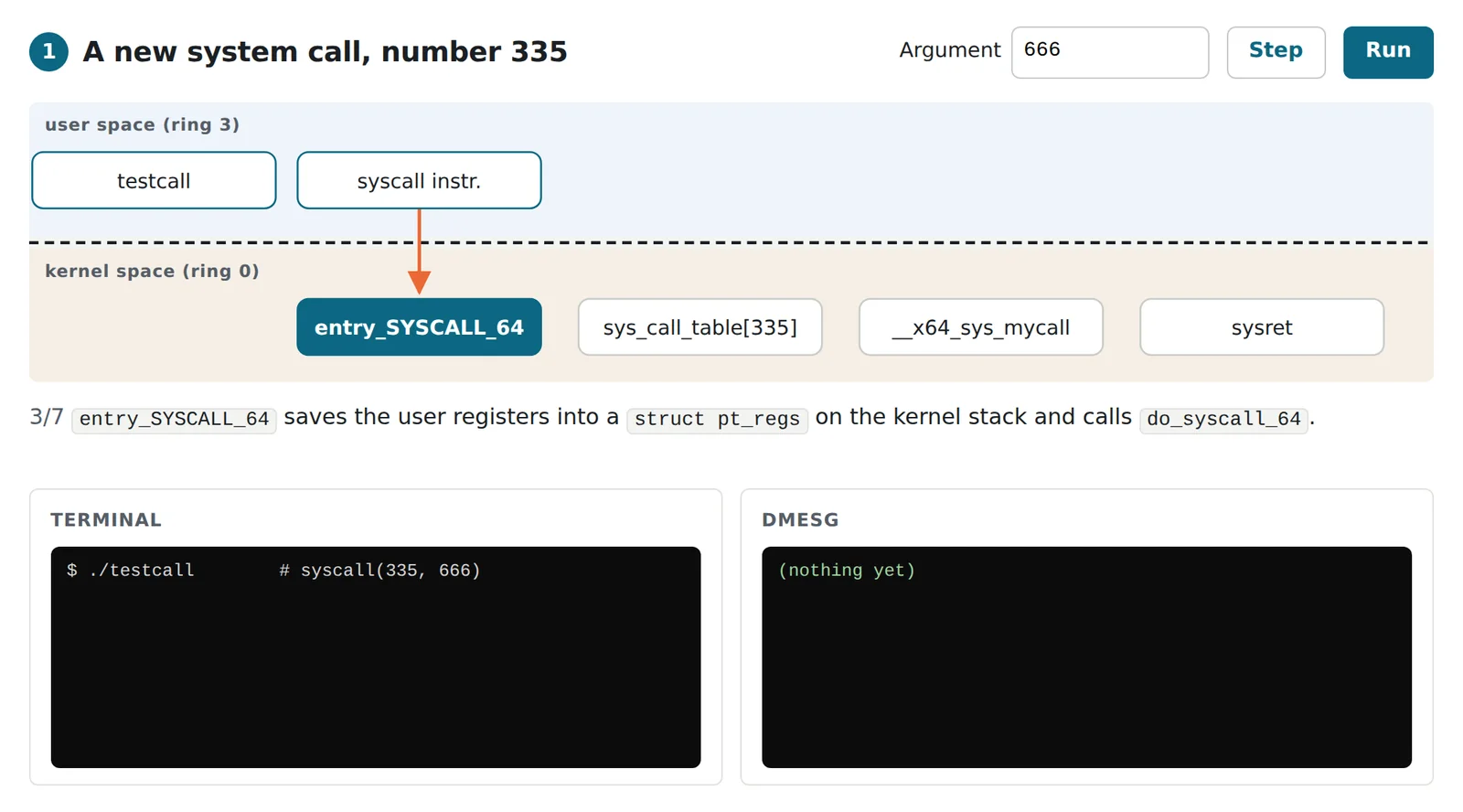
The walkthrough steps through each lab across the line between user space and the kernel, with the terminal and dmesg output the code produces. It is a model: no kernel code runs in your browser.
My contribution
- Added system call 335,
mycall: defined it withSYSCALL_DEFINE1inkernel/sys.c, declared it, and registered__x64_sys_mycallinsyscall_64.tbl. Then configured, compiled (make -j4), installed and booted the 4.20.13 kernel through GRUB, and called it from user space withsyscall(335, 666). - Wrote a HelloWorld kernel module with
module_init,module_exitand a GPL licence, built it with a Makefile that calls the kernel's build system, and loaded, listed and removed it withinsmod,lsmodandrmmod. - Wrote a clock module that creates
/proc/clock/my_clockon load and removes it on unload. Its read handler takes the time withdo_gettimeofdayand copies seconds and microseconds to user space withcopy_to_user.
What the labs cover
The three labs follow one path into the kernel. The first changes the kernel itself: a new entry in the system-call table, a full kernel rebuild and a reboot into it. The second adds code to the running kernel as a module, with no rebuild. The third uses a module to give user programs a new file to read, the usual way for a kernel component to expose data.
The walkthrough follows each lab step by step. For the system call it traces the path from syscall(335, 666) through entry_SYSCALL_64 and the system-call table to the new function and back. For the clock it compares the lab’s test program with cat, with and without the fixed read handler.
Results & validation
- The rebuilt kernel booted (
uname -ashowed 4.20.13);testcallprinted 666 anddmesgshowed the kernel's message. - The module and the clock module loaded and unloaded cleanly, with their messages in
dmesg, and the clock's test program printed the time read from/proc.
The results come from the lab report and its screenshots. The labs were not re-run for this website.
Limitations & next steps
- Reading the clock: the handler returns its text on every read, so the test program, which reads one line with
fgets, prints the time once, andcatprints a fresh timestamp on each read until it is stopped. Returning end of file after the first read withsimple_read_from_buffer, which also respects the reader's buffer size, would make it behave like other/procfiles. - The new call is defined at the end of
kernel/sys.c, next to the 32-bit compatibility calls. It builds because x86-64 configurations enableCONFIG_COMPAT; placing it above that block would make it independent of the option. - The echo test suits non-negative numbers: glibc's
syscall()wrapper reports return values from −4095 to −1 as errors (−1 witherrnoset), and the argument is anint. do_gettimeofdayandstruct timevalwere removed from later kernels; on current kernels the handler would usektime_get_real_ts64.